
Price: ₹8,999 - ₹3,999.00
(as of Aug 13, 2026 18:30:27 UTC – Details)

Product Description


Welcome to WISTAR
WISTAR is a professional laptop battery supplier that continues to provide durable and safe laptop batteries. Wish you a happy shopping!
Brand new battery
100% compatible
Meet OEM specifications
Rechargeable up to 1000+ times
capacity is true, stable current, low self-discharge
short circuit, overheat, and overload protections
Multiple protection
Strong battery life
Good “core” quality

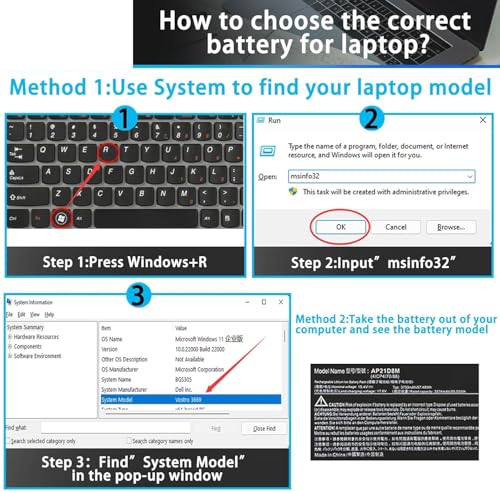
How to get the correct battery?
Step 1: Press the “Windows + R” keys to pop up the window.
Step 2: Enter “msinfo32” and click “OK”.
Step 3: View the “System Model” in the right pane.
Step 1: Shut down the laptop and unplug the power cord.
Step 2: Carefully use a screwdriver to remove the back panel to prevent damage to laptop components.
Step 3: Disconnect the cable connected to the battery, then you can check the model number and specific specifications on the battery.

Battery Usage Maintenance Tips
1. New battery received, please discharge to roughly 10% ~ 20%, then charge it to full. Repeat 3 ~ 5 times to maximize initial battery performance. ( Usually the battery received with about 50% charged )
2. Do not discharge to 0%, it may damage the battery cells and accelerates the aging of battery. ( When the battery is very low, the laptop may suddenly shut down )
3. After the battery power is exhausted, please charge in time, if not charged for a long time, it may lead to battery damage
4. If you plan not to use your laptop for a long time, you need to charge it to more than 70% for storage, and the best storage time is no more than 3 months
5. If you often connect the charger to use the laptop, please use the battery power regularly, more than once a week
6. Please use the original charger or well-known brand charger, inferior charger will affect the normal charging of the battery
7. Regularly clean fan dust to increase heat dissipation and reduce power consumption, which can effectively extend the battery life
8. Percentage of remaining battery and estimate time may fluctuate up and down during battery discharge according to your operating of different software, this is normarl condition. Please pay attention to the actual use time is in the normal range
Reasons and solutions for laptop not recognizing battery
1. Could be caused by battery loose. Remove the battery and try to reinstall, make sure the connector is tighly connected ( Most batteries won’t charge, you can try reinstalling the battery first )
2. May be due to conductive material damaged which the laptop motherboard and battery anode and cathode contact position, you can try to confirm it with your original battery
3. Check whether the battery drive is in normal condition, if not, download the corresponding driver software to update
4. Take out the battery and press the power button for about 15 seconds to consume the internal residual power (Do not connect the power cord), and then reinstall the battery. You can try several times
Installation Suggestion
1. Battery installation is easy, but we also recommend you to learn related installation video on the web in advance, or just find a repair technician for help
2. Please be careful when install battery. Any damage caused by improper operation will be your own responsibility, hope understand. ( Pay particular attention to the battery connector slot on the laptop’s motherboard, don’t push too hard )
3. If the battery can’t be charged for first installation, please try: Take out the battery and press the power button for about 15 seconds to consume the internal residual power (Do not connect the power cord), and then reinstall the battery. You can try several times.
SPECIFICATION
Battery Model: M69D0Voltage: 11.25VCapacity: 41Wh 3467mAh 3-CellBattery Type: Li-ionCondition: Brand new
REPALCE PART NUMBER
M69D0 07KRV O7KRV 0H4PVC H4PVC 08WRCR 8WRCR 0Y86WG Y86WG 078FWY
COMPATIBLE LAPTOP MODELS
For Dell Latitude 13 5330 Laptop or 2-in-1 SeriesFor Dell Latitude 13 7330 Laptop or 2-in-1 Series (NOT fit for Dell Latitude 7330 Rugged Series)For Dell Latitude 14 7430 Laptop or 2-in-1 SeriesFor Dell Latitude 14 5430 SeriesFor Dell Latitude 15 5530 SeriesFor Dell Latitude 15 7530 SeriesFor Dell Precision 15 3570 Mobile Workstation SeriesFor Dell P104F P104F005 P104F006For Dell P110F P110F002For Dell P133G P133G002For Dell P134G P134G002For Dell P136G P136G002For Dell P137G P137G005For Dell P138G P138G002For Dell P139G P139G002
Attention:
There are 2 different models M69D0 (11.25V 41Wh )& FK0VR ( 15.2V 58Wh ) for these laptops, they come in different sizes. in order to let you purchase the right battery, we strongly suggest you to open the back cover of your laptop and make sure that the battery model you need is M69D0( 11.25V 41Wh ).
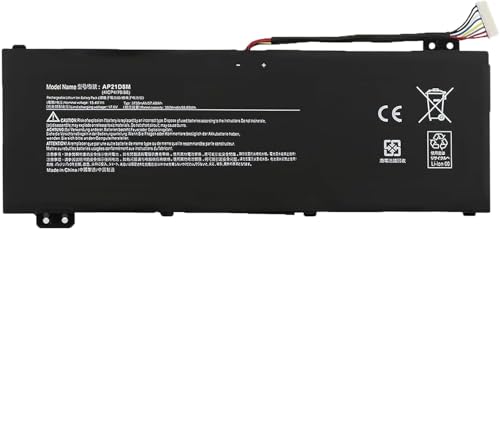
Voltage: 15.4V; Capacity:55.03Wh; Cells:4 cells;
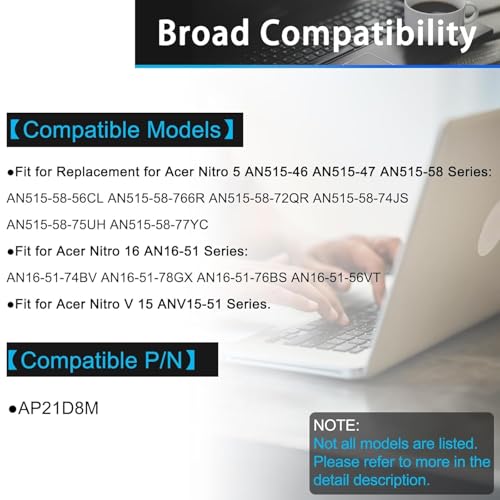
for Acer Nitro5 N22C1 AN515-58-56CL AN515-58-766R
Replacement for Part Number: AP21D8M
【Safe to Use】All WISTAR products are Certified by UL / CE / FCC / RoHS for safety. Strict guidelines for compatibility, strict quality control standards to ensure the true capacity, stable current and low self-discharge and standards compliance for environment safety. We are confident in the performance of the replacement battery.
【Pass Comprehensive Testing】 battery for the Laptop has been tested for best capacity and to ensure that all safety requirements are met – all before installation.
